Popular Articles:
How to Purchase the eSIM Complete Step-by-Step Guide
How to Purchase the eSIM Complete Step-by-Step Guide
Ngày đăng: 2026-02-02 257 lượt xem
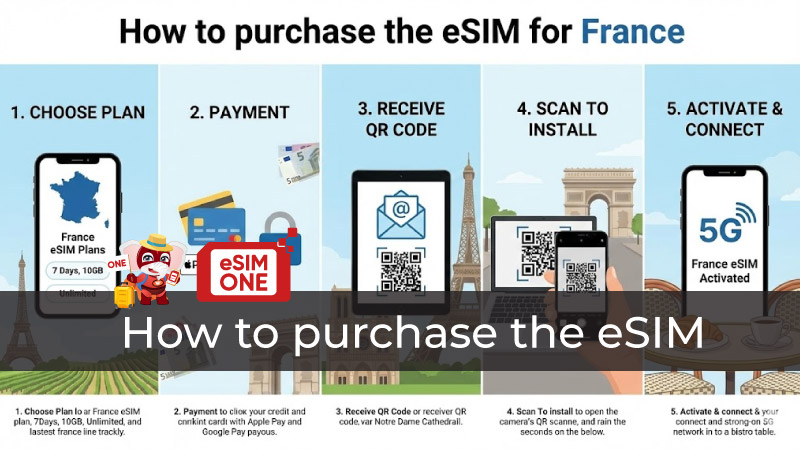
Complete visual guide showing how to purchase the eSIM from device verification through activation
How to purchase the eSIM requires understanding device compatibility, provider selection, payment methods, and activation procedures across global eSIM marketplaces. Discovering How can I purchase an eSIM involves comparing website platforms, dedicated apps, and carrier services offering instant digital delivery within minutes. Can you just buy an eSIM without complications? Absolutely—prepaid eSIM acquisition bypasses registration requirements and long-term contracts. Understanding How to buy eSIM and activate it completes seamless connectivity setup from initial research through post-arrival network registration. This comprehensive guide walks through device verification, provider comparison, purchasing workflows, payment security, QR code management, and installation procedures across iPhone and Android platforms.
Pre-Purchase Preparation: Device Compatibility & Verification
How to Purchase the eSIM: Device Compatibility Check
How to purchase the eSIM begins with critical device compatibility verification: iPhone models from XS, XS Max, and XR onwards (including 11, 12, 13, 14, 15, 16, 17 series plus iPhone SE 2020/2022/2024) support eSIM technology through embedded eUICC chips. Android compatibility spans Samsung Galaxy S20 and newer flagship models, Google Pixel 3 and subsequent releases, plus select Motorola, OPPO, Huawei, and Xiaomi devices manufactured after 2019. Exceptions exist—iPhones purchased in mainland China, Hong Kong, or Macau with dual physical SIM slots lack eSIM capability despite model compatibility, requiring verification before purchase.
EID (eSIM Identifier) verification confirms device support through multiple methods: dial *#06# displaying 32-digit EID numbers confirming embedded SIM presence, navigate iPhone Settings > General > About checking for EID listing, or access Samsung Settings > Connections > SIM Manager looking for "Add eSIM" options. Device unlocking proves equally critical—carrier-locked phones reject third-party eSIM profiles requiring unlock requests from original carriers before international eSIM purchases activate successfully. iPhone users verify unlock status through Settings > General > About > Carrier Lock confirming "No SIM restrictions" messaging.
Provider Research & Selection
How Can I Purchase an eSIM: Choosing the Right Provider
How can I purchase an eSIM effectively demands systematic provider evaluation across five dimensions: destination coverage reliability verifying local carrier partnerships in target countries, pricing competitiveness comparing cost-per-GB across plans, customer support responsiveness assessing 24/7 availability through live chat or WhatsApp, data policy transparency understanding throttling thresholds and fair usage limits, and additional features like VPN security, hotspot allowances, or multi-country flexibility. Coverage verification through provider websites identifies network partners—Saily utilizes T-Mobile in USA and Vodafone in Europe, Airalo partners with AT&T domestically and Orange internationally, while Holafly connects through premium tier-one carriers ensuring reliable 4G/5G performance.
Data allowance calculation prevents mid-trip connectivity loss: light users consuming 1-3GB weekly through navigation apps, messaging platforms, and occasional social media benefit from budget 5-7GB monthly plans priced $10-$15, moderate consumers averaging 3-7GB weekly with video calling and streaming require 15-30GB packages costing $25-$45, while heavy users conducting remote work or content creation justify unlimited plans starting $50-$70 monthly supporting 100GB+ consumption. Customer support quality differentiates providers—Holafly operates 24/7 WhatsApp assistance responding within minutes, Saily offers in-app live chat exclusively, while Airalo maintains omnichannel support through app, website, WhatsApp, and email though response times occasionally extend 2-4 hours during peak periods.

See more compare best éSIM Provider
Top eSIM Providers Comparison: Airalo vs Holafly vs Saily
Comparing How can I purchase an eSIM across leading providers reveals distinct positioning: Airalo dominates budget-conscious segments with USA plans starting $4.50 (1GB/7 days), Europe regional packages from $5 (1GB/7 days covering 39 countries), and global options beginning $9 enabling 200+ destination coverage with metered data suiting cost-aware travelers. Holafly specializes in unlimited data through genuinely unrestricted plans without daily caps or throttling—USA unlimited 15 days at $47, Europe 30 days at $69, supporting 100GB+ consumption ideal for remote workers conducting constant Zoom conferences and content creators uploading 4K footage. Saily balances affordability with security delivering USA 1GB/7 days at $3.99 (cheapest market entry), integrated VPN encryption protecting public WiFi transactions, 24/7 app-based support, and flexible refund policies accepting unused eSIM returns unlike competitors' strict no-refund policies.
Pricing transparency comparison across providers shows Saily marginally cheaper: USA 10GB/30 days costs $22.99 Saily versus $26 Airalo, Europe 5GB/30 days prices $19.49 Saily against $20 Airalo, though Airalo covers additional countries justifying minor premiums. Regional plan economics favor longer validity—Europe 100GB/180 days costs $179.99 Saily ($1.80/GB) versus single-month 10GB packages at $35.99 ($3.60/GB), rewarding committed travelers with 50% per-gigabyte savings. Subscription models emerge through Saily Ultra offering 30GB high-speed plus unlimited 1Mbps data across 113 destinations at $59.99 monthly, optimizing digital nomads requiring consistent multi-country connectivity.
How to Purchase the eSIM: Main Acquisition Methods
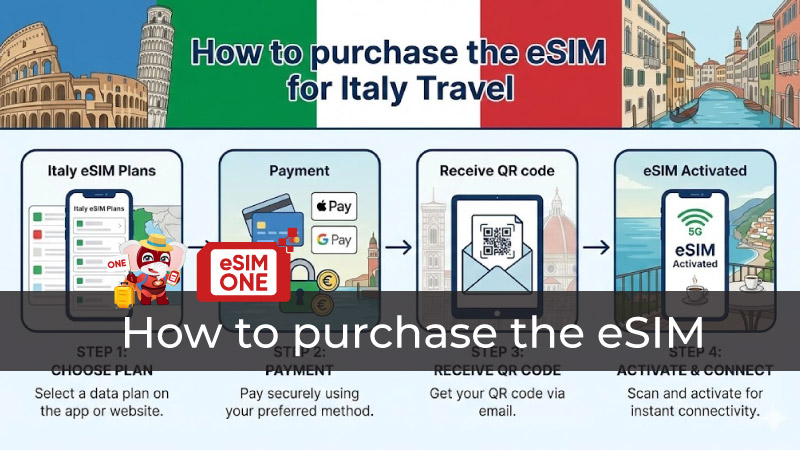 Detail, review, how to purchase the eSIM Italia
Method 1 — Website-Based Direct Purchase
How to purchase the eSIM through provider websites involves straightforward workflows: access merchant platforms (Holafly.com, Airalo.com, Saily.com), select destination countries or regions from dropdown menus, browse available plans filtering by data allowance (1GB to unlimited) and validity periods (7-90 days), compare features like hotspot support and calling capabilities, then proceed to checkout. Account creation requirements vary—Holafly enables guest checkout requiring only email addresses without mandatory registration, Airalo demands account creation with email verification adding 2-3 minutes, while Saily requires app download before purchasing through mobile-first interfaces.
Shopping cart procedures mirror standard e-commerce: add selected plans, review order summaries displaying destination, data amount, validity, and total cost in preferred currencies (USD, EUR, GBP auto-detected by location), apply promotional discount codes offering 5-15% first-purchase savings, then proceed to secure payment gateways. Email delivery occurs within 1-5 minutes post-transaction: providers transmit QR codes as PDF attachments or embedded email images, include SM-DP+ manual activation codes as text backups, and provide installation instructions detailing platform-specific procedures. Dashboard access enables QR code retrieval—login to provider accounts accessing "My eSIMs" sections displaying purchased plans with resend options if original emails misfire into spam folders.
Can You Just Buy an eSIM: Purchase Simplicity Verification
Can you just buy an eSIM without bureaucratic complexity? Absolutely yes—prepaid eSIM purchases eliminate traditional mobile plan obstacles: no long-term contracts binding customers to 12-24 month commitments, no credit checks evaluating financial history, no identity verification demanding passport submissions or address confirmations (email suffices), and no deposit requirements common with postpaid services. Instant digital delivery transforms acquisition speed—traditional SIM cards require 5-14 days shipping or airport kiosk hunting upon arrival, while eSIM QR codes arrive via email within 1-5 minutes enabling pre-departure installation on home WiFi networks.
Guest checkout availability through Holafly streamlines purchasing to 3-5 minutes: select destination, choose plan, enter email, complete payment, receive QR code—no account creation interrupting workflows. Alternative providers requiring accounts still maintain simplicity—Airalo and Saily demand only email addresses and passwords without phone verification, physical address submission, or documentation uploads. Flexibility extends to modifications: most providers allow plan changes before activation, top-up purchases when approaching data limits, and validity extensions adding 7-30 day increments without replacing entire eSIM profiles.
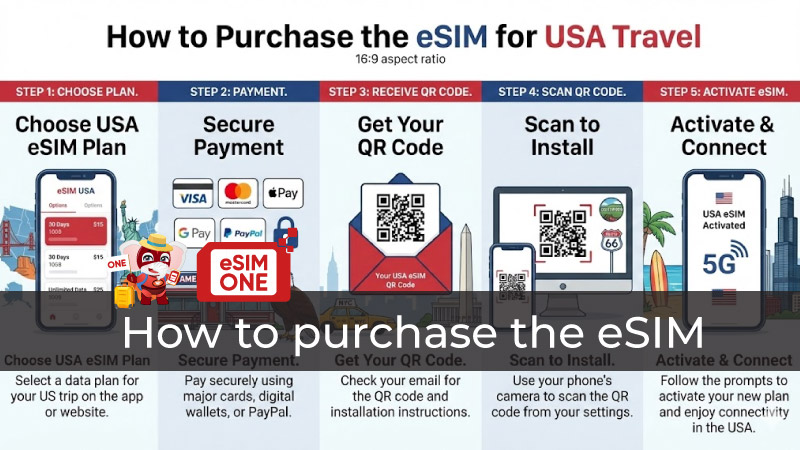 Review eSIM USA for travel, step by step
Payment Processing & Security
How to Purchase the eSIM: Payment Methods Available
How to purchase the eSIM financially involves diverse payment options: credit cards (Visa, Mastercard, American Express) accept globally with instant transaction confirmation, debit cards process identically through same payment gateways, PayPal integration enables balance payments or linked account charging without exposing card details, digital wallets (Apple Pay, Google Pay) streamline mobile checkout through biometric authentication (Face ID, Touch ID), and alternative methods like bank transfers or cryptocurrency acceptance vary by provider. Multi-currency billing displays prices in traveler home currencies—USD for Americans, EUR for Europeans, GBP for British, AUD for Australians—with automatic conversion at checkout preventing post-purchase exchange rate surprises.
Payment security verification prevents fraud: confirm HTTPS padlock symbols in browser address bars indicating SSL/TLS encryption, verify PCI DSS compliance badges on checkout pages demonstrating payment card industry security standards, enable two-factor authentication when available adding secondary verification layers, and research provider reputation through Trustpilot reviews or Better Business Bureau ratings before submitting financial information. Refund policies vary significantly—Saily offers flexible returns on unused eSIMs, Holafly provides 7-day money-back guarantees if unsatisfied, while Airalo restricts refunds to uninstalled profiles only preventing activation testing before commitment.
QR Code Delivery & Management
How to Purchase the eSIM: Receiving Your QR Code
Upon completing How to purchase the eSIM transactions, QR code delivery occurs through multiple channels: email transmission within 1-5 minutes as PDF attachments or embedded images viewable on secondary devices during installation, in-app delivery through provider dashboards accessible under "My eSIMs" or "Purchased Plans" sections permanently archiving codes for repeated access, and SMS delivery in rare cases though email remains primary method. Backup activation codes accompany QR images—SM-DP+ addresses formatted as "LPA:1$server.address$activation-code" enable manual entry when QR scanning fails due to poor lighting, damaged displays, or camera malfunctions.
Storage strategies ensure redundant access: screenshot QR codes saving to phone Photos app or Android Gallery for offline availability, forward confirmation emails to secondary addresses (personal Gmail plus work Outlook) preventing single-account dependency, upload PDFs to cloud storage (Google Drive, iCloud, Dropbox) enabling cross-device retrieval, and print physical copies as ultimate backups if devices malfunction during travels. Resend procedures through provider dashboards allow requesting duplicate QR codes—most platforms enable unlimited resends without fees if original emails route to spam folders or users accidentally delete messages.
How to Buy eSIM and Activate It: Installation Procedures
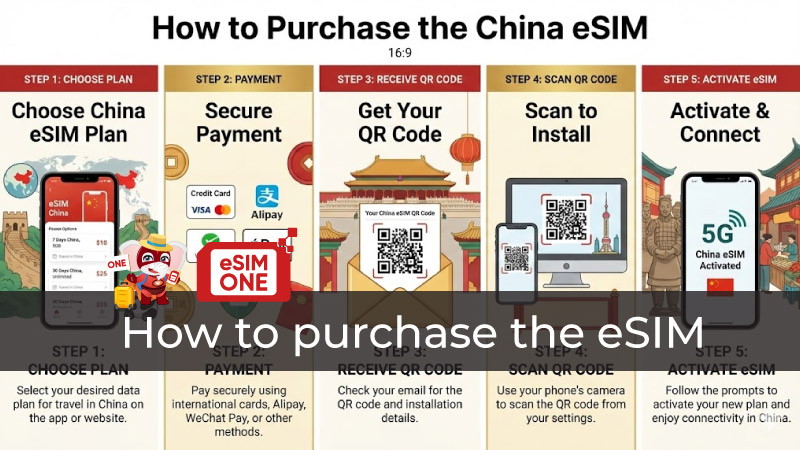 How to purchase the eSIM China
How to Buy eSIM and Activate It: iPhone Installation
How to buy eSIM and activate it on iPhone requires systematic procedures: ensure WiFi connectivity and 50%+ battery charge preventing installation interruptions, navigate Settings > Cellular (or Mobile Data in some regions) > Add eSIM, select "Use QR Code" option launching camera interface, position phone 4-6 inches from QR code displayed on secondary device or printed paper enabling automatic scanning within 2-3 seconds. Alternative manual entry utilizes "Enter Details Manually" selecting SM-DP+ Address input fields, copying activation codes from emails, pasting into forms, and tapping "Continue" initiating profile downloads completing within 15-30 seconds.
Profile labeling improves organization: tap newly installed eSIM, select "Label" option, enter descriptive names like "Europe Travel" or "USA Business Trip" facilitating easy identification when managing multiple profiles, then configure as primary or secondary line through "Default Voice Line" and "Cellular Data" settings determining which SIM handles calls versus data. Data Roaming enablement proves counterintuitive—despite "roaming" terminology suggesting expensive charges, this toggle activates eSIM connectivity functioning as local network access rather than international roaming, requiring "ON" status for proper operation. Testing confirms activation: verify carrier name displays in status bar, conduct speed test through Speedtest app confirming 4G/5G performance, and browse websites ensuring functional data connectivity.
- Check mobile full device, check compatibility: https://esimone.com/check-device
How to Buy eSIM and Activate It: Android Installation
How to buy eSIM and activate it on Android varies by manufacturer: Samsung Galaxy users navigate Settings > Connections > SIM Manager > Add eSIM scanning QR codes through built-in camera functionality, Google Pixel owners access Settings > Network & Internet > SIMs > Download a SIM instead initiating QR scanning, while other Android brands follow similar "Mobile Network" or "SIM Card Manager" paths with minor interface variations. Manual entry alternatives exist when scanning fails—select "Enter activation code manually" options, input SM-DP+ server addresses and activation codes from provider emails, confirm entries, and wait 20-40 seconds for profile downloads.
Network configuration typically completes automatically though manual verification prevents issues: access Mobile Networks settings confirming correct carrier selection, verify APN (Access Point Name) configuration matches provider specifications if connectivity fails, enable data roaming toggles despite counterintuitive naming allowing eSIM network access, and restart devices if signal indicators remain absent 5+ minutes post-installation. Performance testing confirms successful activation: check status bar displaying carrier name and signal strength, conduct Speedtest measurements verifying 15-80 Mbps speeds depending on location and network congestion, browse websites and social media confirming functional connectivity, and test hotspot sharing if plan includes tethering capabilities.
H2: Frequently Asked Questions: How to Purchase the eSIM
How to Purchase the eSIM Fastest?
How to purchase the eSIM most rapidly? Holafly's guest checkout completes fastest requiring 3-5 minutes: select destination, choose plan, enter email, submit payment, receive QR code—no account creation delays. Airalo and Saily require account setup adding 2-3 minutes for first-time users though subsequent purchases accelerate through stored payment methods and saved preferences. Carrier purchases through AT&T, Verizon, or T-Mobile extend timelines to 10-20 minutes due to identity verification requirements and plan compatibility checks limiting speed advantages.
How Can I Purchase an eSIM Without Internet?
How can I purchase an eSIM offline? Pre-purchase while connected to WiFi or cellular data before traveling, receiving QR codes via email for later offline installation using printed codes or saved screenshots, though initial purchase requires internet connectivity. Installation itself requires WiFi for profile download—airport, hotel, or cafe networks suffice for 30-second eSIM activation procedures enabling subsequent cellular connectivity.
Can You Just Buy an eSIM Without Account Creation?
Can you just buy an eSIM without accounts? Holafly enables guest checkout requiring only email addresses for QR code delivery without mandatory registration, while most competitors including Airalo, Saily, and Nomad require account creation though processes demand merely email and password without identity verification. Account benefits include purchase history access, easy top-ups, and multiple eSIM management justifying brief signup procedures.
How to Buy eSIM and Activate It from Different Countries?
How to buy eSIM and activate it internationally? Global providers support worldwide purchasing from any location—American travelers buy European eSIMs from USA, Asian visitors purchase USA plans from Japan, African tourists acquire global eSIMs from Kenya—with activation timing varying by provider policies (some activate immediately upon installation, others trigger upon first destination network connection). Pre-departure installation on home WiFi enables testing device compatibility and troubleshooting issues before international departures.
Author: Leon
5/5 - (4 votes)
Related Articles
How to buy eSIM online in Vietnam is the easiest way to get connected before you land, avoid SIM-shop queues, and start using maps, Grab, and translat...

The eSIM France choice for most UK travellers in 2026 is a prepaid travel eSIM you can install before you fly, then switch on the moment you land in P...

The best eSIM for Canadian travellers in 2026 depends on three things: whether the trip is Canada-only or crosses into the USA, whether a local phone ...

The best eSIM for UK visitors in 2026 connects you to fast 4G/5G data from the moment you land — no airport SIM kiosk, no queuing, and no being locked...

The best eSIM for Thailand UK travelers can buy in 2026 is a pre-activated plan on AIS or TrueMove H that you install at home, costs a fraction of wha...